Sensitive personal data, locked with your own key
Personnel details, certificates, injury and health records and survey answers are kept in an encrypted vault inside your IMS. Only the people you choose can open it — not Creative IMS, and not the hosting provider.
- Encrypted before it is saved — each item with its own AES-256 key
- You decide who holds the key, each with their own vault password
- A printed recovery code gets you back in if a password is forgotten
- Locks itself, and logs every unlock, wrong password and change of holder
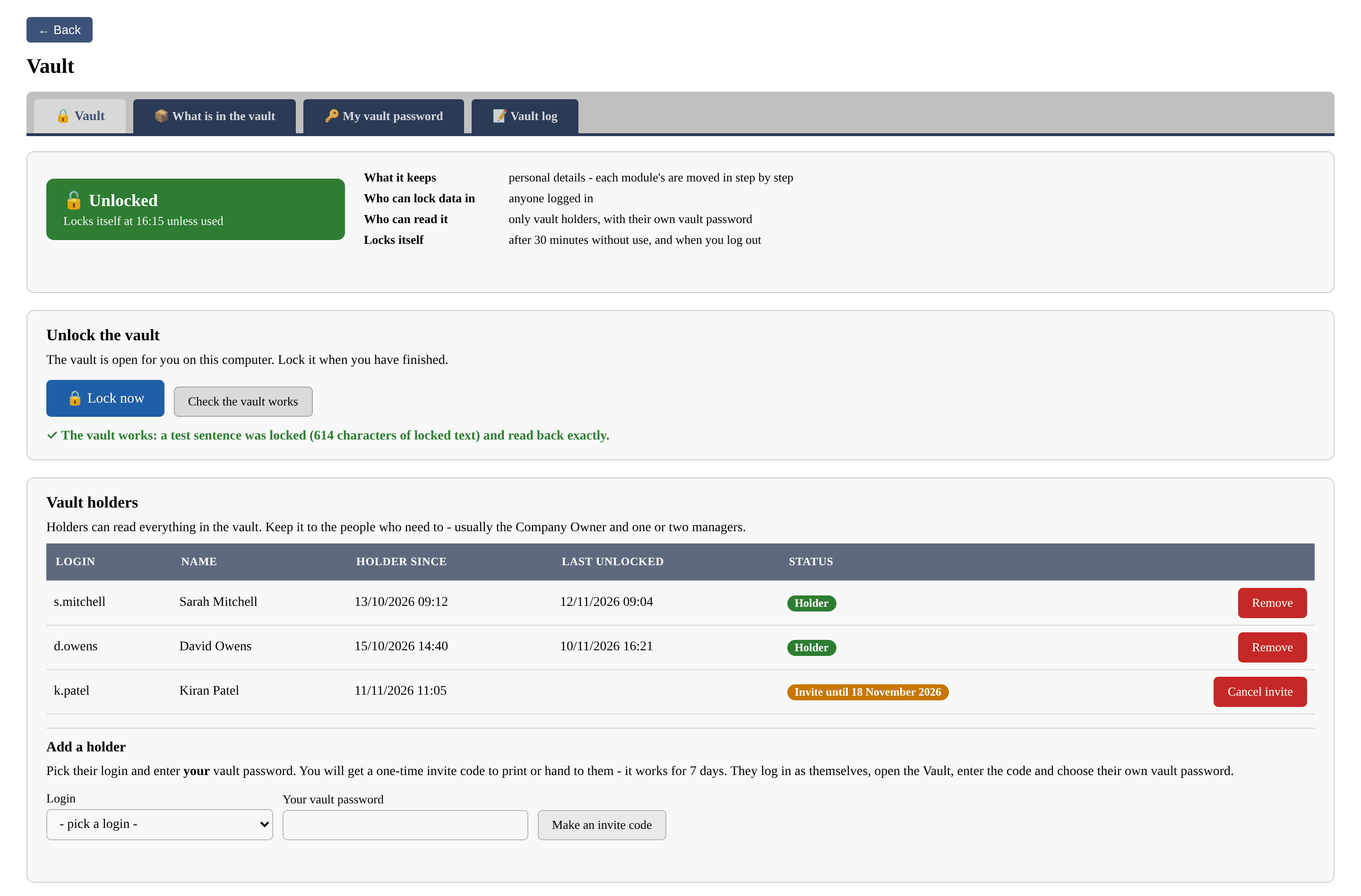
The Vault page in the IMS — unlocked, with the vault check passed and the vault holders listed. Shown with sample data. 🔍 Click the picture to see it full size.
The personal details, locked. The compliance picture, still clear.
Only the personal and sensitive parts of a record are locked. Dates, statuses, KPIs, overdue warnings and actions keep working from the rest. Each module is moved in when you choose, and can be taken out again.
Personnel
Date of birth, NI number, address, phone, emergency contact and employment contracts. The first name and surname initial stay readable.
Training certificates
The scanned certificate and the text read from it. The course, dates, expiry and result stay readable for the Training Matrix.
Accidents & near misses
The Accident Book, Minor Injuries and Near Misses: the person's details, the injury and what happened, witnesses and their statements.
Health Surveillance
Ref numbers, outcome notes, referrals and follow-up. The outcome (Fit / Fit – Restricted / Unfit), dates and actions stay readable.
Stress Survey
Every answer and comment. The scores, department, team and who has responded stay readable, so the results and actions still work.
Disability Assessments
The condition details, adjustments, fit notes and medication notes. The status, risk level, dates and actions stay readable.
Visitor Book
Each visitor's full name, phone, email, vehicle registration, photo and notes. The name shows as first name and initial.
Information Security Incidents
The description, assessment notes, containment and recovery actions, evidence notes and root cause.
Locked before it is saved. Only a holder can unlock it.
Anyone with an IMS login can put information into the vault. Only a vault holder can read it back.
Each item gets its own key
Every locked item is encrypted with its own AES-256 key before it is stored in your database.
The key is locked away
That item key is then locked with the vault's lock — a key that can lock but can never unlock.
Only holders have the unlock key
The vault's unlock key is itself locked with each holder's own vault password, and is only opened in that holder's browser.
Nobody else can read it
All unlocking happens in the browser, so the server — and anyone with the database — only ever sees locked copies. That includes Creative IMS and the hosting provider.
You decide who can open it
The vault belongs to your organisation. Your Company Owner sets it up and controls who holds the key.
🔑 Vault holders
- Your Company Owner sets the vault up and becomes the first holder.
- To add a holder, pick their login and hand them a one-time invite code — it lasts 7 days.
- Each holder chooses their own vault password (at least 10 characters), separate from their IMS login, and prints their own recovery code. No shared passwords.
- Holders can be removed at any time — except the last one, so you can never be locked out.
- Staff who aren't holders can still lock information in, but can't read it back.
⏱ Locks itself, logs everything
- Locks after 30 minutes without use, after 10 hours at most, and whenever the holder logs out.
- A Lock now button for when you step away.
- The vault log records every set-up, unlock, lock, wrong password, invite and removal — who, and when.
- "Check the vault works" locks a test sentence and reads it back, so you can see it working.
- Holders can change their vault password whenever they like, and the browser is never allowed to save or fill in a vault password.
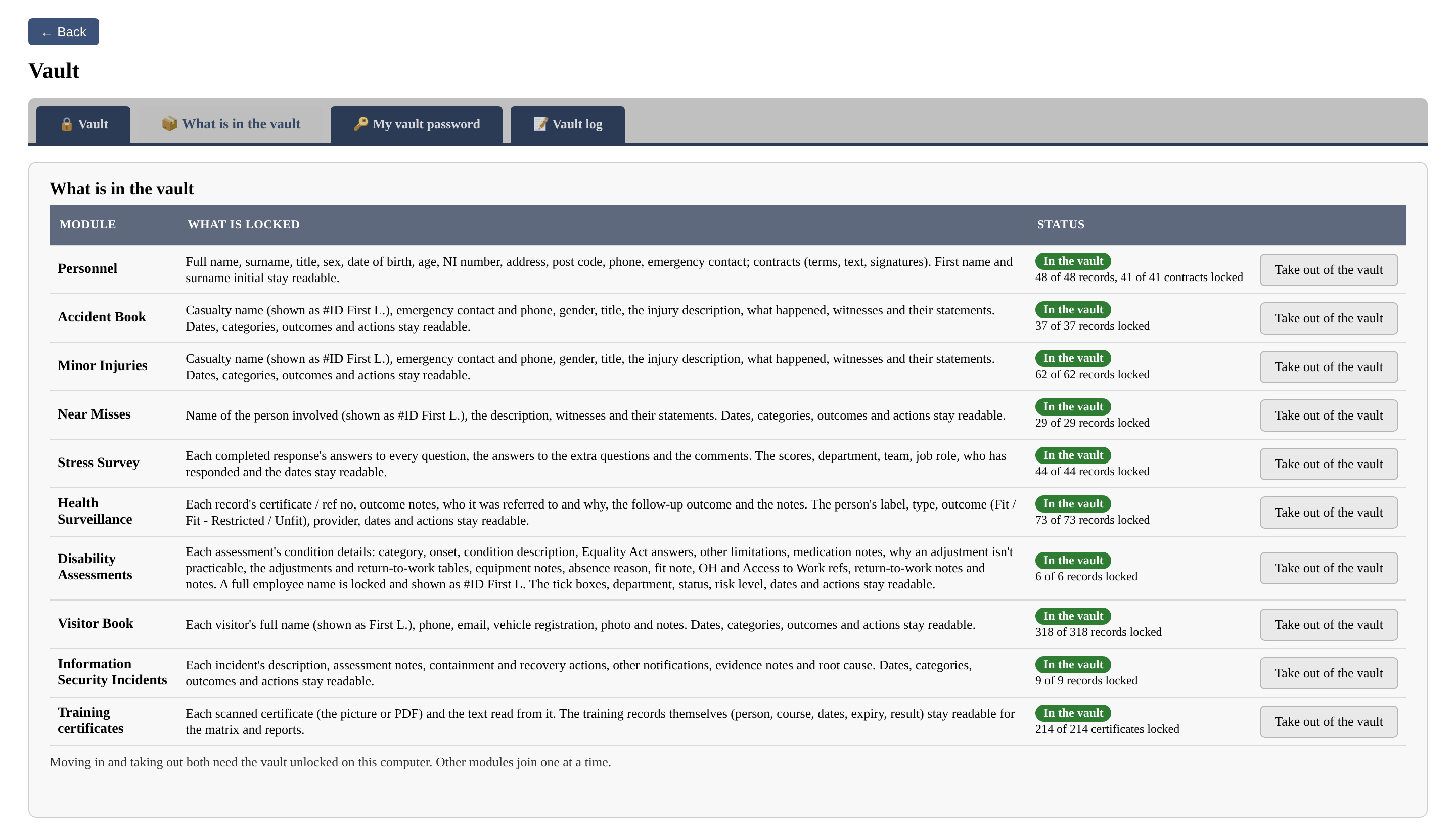
"What is in the vault" — each module, exactly what is locked and what stays readable, and how many records are in the vault. Modules are moved in (and can be taken out again) by a vault holder, and every locked copy is checked before the readable copy is removed. Shown with sample data. 🔍 Click the picture to see it full size.
The recovery code is your way back in
When a holder sets up their vault password, they are given a 25-character recovery code to print and keep somewhere safe. It is shown once, and the page won't close until they confirm it is printed or written down. If they forget their password:
- Open the Vault page and go to My vault password → Forgotten my vault password.
- Enter the code and choose a new vault password.
- A new recovery code is given to print — the old one stops working.
A holder can also make a new recovery code at any time, for example if the old one is lost or may have been seen.
Common questions about the Secure Vault
Can Creative IMS read the data in our vault?
No. The vault can only be opened with one of your vault holders' passwords or your recovery code, and neither is held by Creative IMS. Our administrator account, used for support and maintenance, can't open it either, and nor can Microsoft as the hosting provider.
What happens if I forget my vault password?
Use your printed recovery code on the Vault page, then choose a new vault password. A new recovery code is then printed and the old one stops working. If your organisation has more than one holder, another holder can still open the vault in the meantime.
What if we lose both the password and the recovery code?
If every holder's password and recovery code are lost, the locked information cannot be recovered by anyone, including us. This is deliberate — a vault that could be opened another way wouldn't be secure. Having two or more holders, each with their recovery code kept safely, avoids this.
Is the vault password the same as my IMS login?
No. It is a separate password of at least 10 characters, chosen by each holder. Logging in to the IMS doesn't open the vault — a holder unlocks it separately, and it locks itself again after 30 minutes without use, after 10 hours at most, or at log out.
Who can put information into the vault?
Anyone with an IMS login can lock information in as part of their normal work — for example recording an accident. Only vault holders can read it back.
Do our KPIs, reports and overdue warnings still work?
Yes. Only the personal and sensitive details are locked. Dates, statuses, counts, overdue and urgent warnings and actions still work from the readable parts of each record, and people show as an ID, first name and surname initial (for example #17 Luke R.). Each module shows exactly what is locked and what stays readable.
How do we add or remove a vault holder?
The Company Owner picks the person's login and is given a one-time invite code to hand to them; it lasts 7 days. They enter it on the Vault page and choose their own vault password. Holders can be removed at any time, apart from the last one.
Can we see who has opened the vault?
Yes. The vault log records every set-up, unlock, lock, wrong password, invite and removal, with who did it and when.
Does this help with UK GDPR and ISO 27001?
It supports them. Encrypting special category and other sensitive personal data, limiting access to named people and keeping a log of access are measures that UK GDPR and ISO 27001 look for. Whether your arrangements are compliant overall is for your organisation to judge.
See the Secure Vault for yourself
We'll show you how it works with sample data in a short live demo, or answer your questions by email.